

UART DMA
UART DMA的示例工程用于实现uart的DMA方式收发数据。
UART DMA示例的源代码和工程文件位于SDK_Folder\projects\peripheral\uart\uart_dma,其中工程文件在文件夹Keil_5下。
代码理解
示例工程流程图如图 32所示:
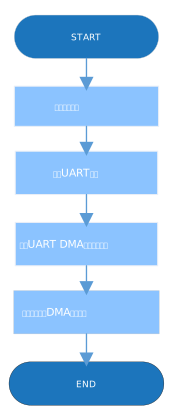
- 配置UART模块。
g_uart_handle.p_instance = SERIAL_PORT_GRP; g_uart_handle.init.baud_rate = 115200; g_uart_handle.init.data_bits = UART_DATABITS_8; g_uart_handle.init.stop_bits = UART_STOPBITS_1; g_uart_handle.init.parity = UART_PARITY_NONE; g_uart_handle.init.hw_flow_ctrl = UART_HWCONTROL_NONE; g_uart_handle.init.rx_timeout_mode = UART_RECEIVER_TIMEOUT_ENABLE; hal_uart_deinit(&g_uart_handle); hal_uart_init(&g_uart_handle);- init.baud_rate:UART波特率。
- init.data_bits:UART数据位。
- init.stop_bits:UART停止位。
- init.parity:UART奇偶校验位。
- init.hw_flow_ctrl:硬件流控使能位。
- init.rx_timeout_mode:接收超时使能位。
- 调用hal_uart_transmit_dma()接口发送数据,接收结果与状态通过回调函数hal_uart_rx_cplt_callback()返回,用户可在此函数自定义可执行操作。因采用非阻塞方式的接口,需在后续步骤中用while判断是否收发完成。代码如下:
void hal_uart_rx_cplt_callback(uart_handle_t *p_uart) { rdone = 1; rlen = p_uart->rx_xfer_size - p_uart->rx_xfer_count; memcpy(g_tdata, g_rdata, rlen); memset(g_rdata, 0, sizeof(g_rdata)); } void hal_uart_tx_cplt_callback(uart_handle_t *p_uart) { tdone = 1; } void hal_uart_error_callback(uart_handle_t *p_uart) { tdone = 1; rdone = 1; } hal_uart_transmit_dma(&g_uart_handle, g_print_str1, 55); while (hal_uart_get_state(&g_uart_handle) != HAL_UART_STATE_READY); hal_uart_transmit_dma(&g_uart_handle, g_print_str2, 8); while (hal_uart_get_state(&g_uart_handle) != HAL_UART_STATE_READY); - 调用hal_uart_transmit_dma()发送接收到的数据,发送结果与状态通过回调函数hal_uart_tx_cplt_callback()返回,直到收到的数据为‘0’时,测试结束。代码如下:
do {
    rdone = 0;
    hal_uart_receive_dma(&g_uart_handle, g_rdata, sizeof(g_rdata));
    while (0 == rdone);
    tdone = 0;
    hal_uart_transmit_dma(&g_uart_handle, g_tdata, rlen);
    while (0 == tdone);
} while (g_tdata[0] != '0');
测试验证
- 用GProgrammer下载uart_dma.bin至开发板。
- 将开发板串口连接至PC端,打开并配置GRUart。
- 在GRUart的Receive Data窗口中将会显示通过UART接收与发送的数据信息。