

I2C DMA UART
I2C DMA UART示例实现了I2C如何通过DMA方式发送从UART中接收的数据。
I2C DMA UART示例的源代码和工程文件位于SDK_Folder\projects\peripheral\i2c\i2c_dma_uart,其中工程文件在文件夹Keil_5下。
代码理解
示例工程流程图如图 15所示:
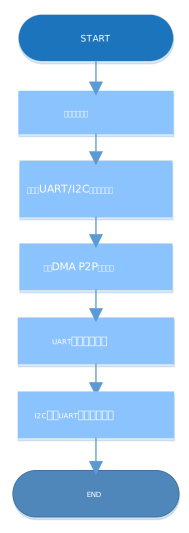
- 配置I2C模块。
p_i2c_handle.p_instance = I2C_MODULE; p_i2c_handle.init.speed = I2C_SPEED_400K; p_i2c_handle.init.own_address = 0x55; p_i2c_handle.init.addressing_mode = I2C_ADDRESSINGMODE_7BIT; p_i2c_handle.init.general_call_mode = I2C_GENERALCALL_DISABLE; hal_i2c_deinit(&p_i2c_handle); hal_i2c_init(&p_i2c_handle);- init.speed:I2C传输速度选择,可选择I2C_SPEED_100K、I2C_SPEED_400K、I2C_SPEED_1000K、I2C_SPEED_2000K。
- init.own_address:I2C本地地址设置,7位或者10位地址,用户可自定义。
- init.addressing_mode:I2C地址模式选择,可选择I2C_ADDRESSINGMODE_7BIT、I2C_ADDRESSINGMODE_10BIT。
- init.general_call_mode:I2C通用呼叫寻址模式选择,可选择I2C_GENERALCALL_DISABLE、I2C_GENERALCALL_ENABLE。
- I2C硬件初始化。
void hal_i2c_msp_init(i2c_handle_t * p_i2c)
{
    gpio_init_t gpio_config = GPIO_DEFAULT_CONFIG;

    gpio_config.mode = GPIO_MODE_MUX;
    gpio_config.pull = GPIO_PULLUP;
    gpio_config.pin  = I2C_SCL_PIN | I2C_SDA_PIN;
    gpio_config.mux  = I2C_GPIO_MUX;
    hal_gpio_init(I2C_GPIO_PORT, &gpio_config);	                   (1)

    __HAL_LINKDMA(p_i2c, p_dmatx, s_dma_handle);
    /* Configure the DMA handler for Transmission process */
    hi2c->p_dmatx->channel                 = DMA_Channel0;
    hi2c->p_dmatx->init.direction           = DMA_PERIPH_TO_PERIPH;	(2)
    hi2c->p_dmatx->init.src_request         = DMA_REQUEST_UART0_RX;	(3)
    hi2c->p_dmatx->init.dst_request          = DMA_REQUEST_I2C0_TX;	(4)
    hi2c->p_dmatx->init.src_increment        = DMA_SRC_NO_CHANGE;	  (5)
    hi2c->p_dmatx->init.dst_increment        = DMA_DST_NO_CHANGE;	  (6)
    hi2c->p_dmatx->init.src_data_alignment  = DMA_SDATAALIGN_BYTE;	 (7)
    hi2c->p_dmatx->init.dst_data_alignment  = DMA_DDATAALIGN_BYTE;	 (8)
    hi2c->p_dmatx->init.mode                   = DMA_NORMAL;
    hi2c->p_dmatx->init.priority              = DMA_PRIORITY_LOW;

    hal_dma_deinit(p_i2c->p_dmatx);
    hal_dma_init(p_i2c->p_dmatx);
}
相关说明如下:
(1):硬件IO初始化,将I2C映射的引脚配置为I2C模式。
(2):配置DMA为P2P模式。
(3)~(4):配置DMA通道源和目标分别为UART RX和I2C TX。
(5)~(6):DMA通道源和目标地址都为固定模式。
(7)~(8):DMA通道传输单元位宽为8 bits。
- 配置从设备地址。
在传输之前需要将I2C设置为Master,并配置从设备地址。代码如下:
/* Enable Master Mode and Set Slave Address */ ll_i2c_disable(p_i2c_handle->p_instance); ll_i2c_enable_master_mode(p_i2c_handle->p_instance); ll_i2c_set_slave_address(p_i2c_handle->p_instance, SLAVE_DEV_ADDR); ll_i2c_enable(p_i2c_handle->p_instance); - 设置UART接收阈值与DMA Burst长度。代码如下:
ll_i2c_set_dma_tx_data_level(p_i2c_handle->p_instance, 4U); ll_uart_set_rx_fifo_threshold(LOG_UART_GRP, LL_UART_RX_FIFO_TH_CHAR_1); ll_dma_set_source_burst_length(DMA, p_i2c_handle->p_dmatx->channel, LL_DMA_SRC_BURST_LENGTH_1); ll_dma_set_destination_burst_length(DMA, p_i2c_handle->p_dmatx->channel, LL_DMA_DST_BURST_LENGTH_4); - 等待UART接收到数据。代码如下:
/* Wait until receive any data */ while(!ll_uart_is_active_flag_rfne(SERIAL_PORT_GRP)); - 开始DMA传输并等待传输完成。代码如下:
hal_dma_start(p_i2c_handle->p_dmatx, (uint32_t)&UART0->RBR_DLL_THR, (uint32_t)& p_i2c_handle->p_instance->DATA_CMD, TEST_LENGTH); /* Enable DMA Request */ ll_i2c_enable_dma_req_tx(p_i2c_handle->p_instance); hal_dma_poll_for_transfer(p_i2c_handle->p_dmatx, 1000); - I2C数据传输的最后一个字节需要使能STOP信号,因此在DMA传输完成后需增加STOP流程。代码如下:
/* Disable DMA Request */
ll_i2c_disable_dma_req_tx(p_i2c_handle->p_instance);
while(RESET == ll_i2c_is_active_flag_status_tfnf(p_i2c_handle->p_instance));
ll_i2c_transmit_data8(p_i2c_handle->p_instance, 0, LL_I2C_CMD_MST_WRITE |
    LL_I2C_CMD_MST_GEN_STOP);
测试验证
- 用GProgrammer下载i2c_dma_uart.bin至开发板。
- 将开发板串口连接至PC端,打开并配置GRUart。
- 在GRUart的Receive Data窗口中将会显示I2C通过DMA方式发送从UART中接收的数据的执行结果。